Back to Blog
AI cost control needs more than one layer. Microsoft Foundry shows why

November 20, 2026
•
AI Agents


"An AI agent that nobody uses is a sunk cost. An AI agent that everybody uses can become a significant operational expense."
We wrote that in a post on LinkedIn. It describes the awkward side of AI cost control: the better an agent works, the more it can cost to run.
Picture an agent that answers supplier questions. In the pilot, a few dozen colleagues use it and the cost per conversation looks like a rounding error. A year later it runs inside three departments, calls a larger model than it needs and handles thousands of requests a day. Nobody did anything wrong. The bill simply grew with the success.
At Microsoft Ignite on 17 November 2026, Microsoft announced Cost in Microsoft Foundry in preview. It gives one view of spend across agents, models and tools, with a forecast and a month-end report on the assets driving the most cost.
Useful. But a view is not a brake.
So where should the brakes sit, and who should hold them?
AI cost control is the set of limits, alerts and reports that keeps spending on models and agents in line with the value they deliver. In Microsoft Foundry, costs follow a hierarchy from subscription down to an agent or model deployment, and Foundry cost controls can alert or block new requests when usage reaches thresholds you set.
Microsoft's own definition of FinOps is a helpful starting point. Microsoft describes it as an operational framework and cultural practice that brings finance, engineering and business teams together. Its stated goal is not to save money but to maximise business value from the cloud.
Foundry cost controls are a policy that tracks spending or token usage for the projects, model deployments, agents or hosted agent sessions you choose. When usage reaches a threshold you set, the control sends an alert or blocks new requests. Usage is counted as requests run, so a control can act before an overrun reaches the invoice.
Each control combines five things, according to Microsoft's documentation on cost controls (Microsoft Learn, accessed November 2026). There is a budget in US dollars or tokens, the usage it applies to, and how the budget is shared: one total, or a full amount per agent, session or project. There is also a daily, weekly or monthly reset, plus threshold actions. Microsoft's example is an alert at 80% and a block at 100% (Microsoft Learn, accessed November 2026).
"A budget alert is a smoke detector. An agent also needs a circuit breaker," writes Steve Sweetman, VP of Product Management, Foundry Models at Microsoft, in The economics of agent optimization.
Timing explains why. In Foundry, usage data such as tokens, runs and tool calls appears within minutes, while billed cost appears 8 to 24 hours after usage (Microsoft Learn, accessed November 2026). Cost control totals update in real time. An agent stuck in a loop has plenty of time to misbehave before an alert based on billed cost fires.
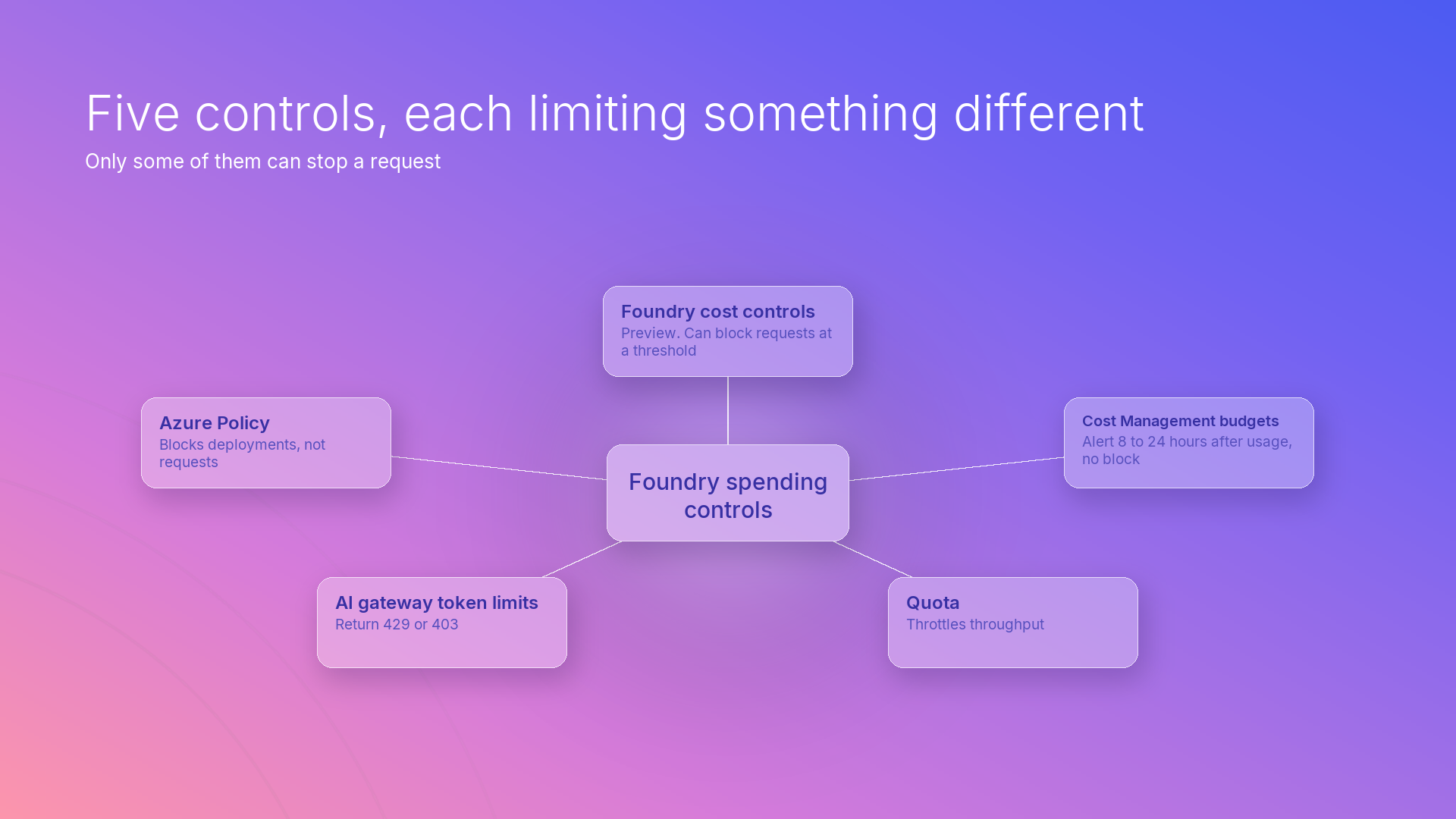
Microsoft lists five Foundry spending controls that work together, each limiting something different (Microsoft Learn, accessed November 2026):
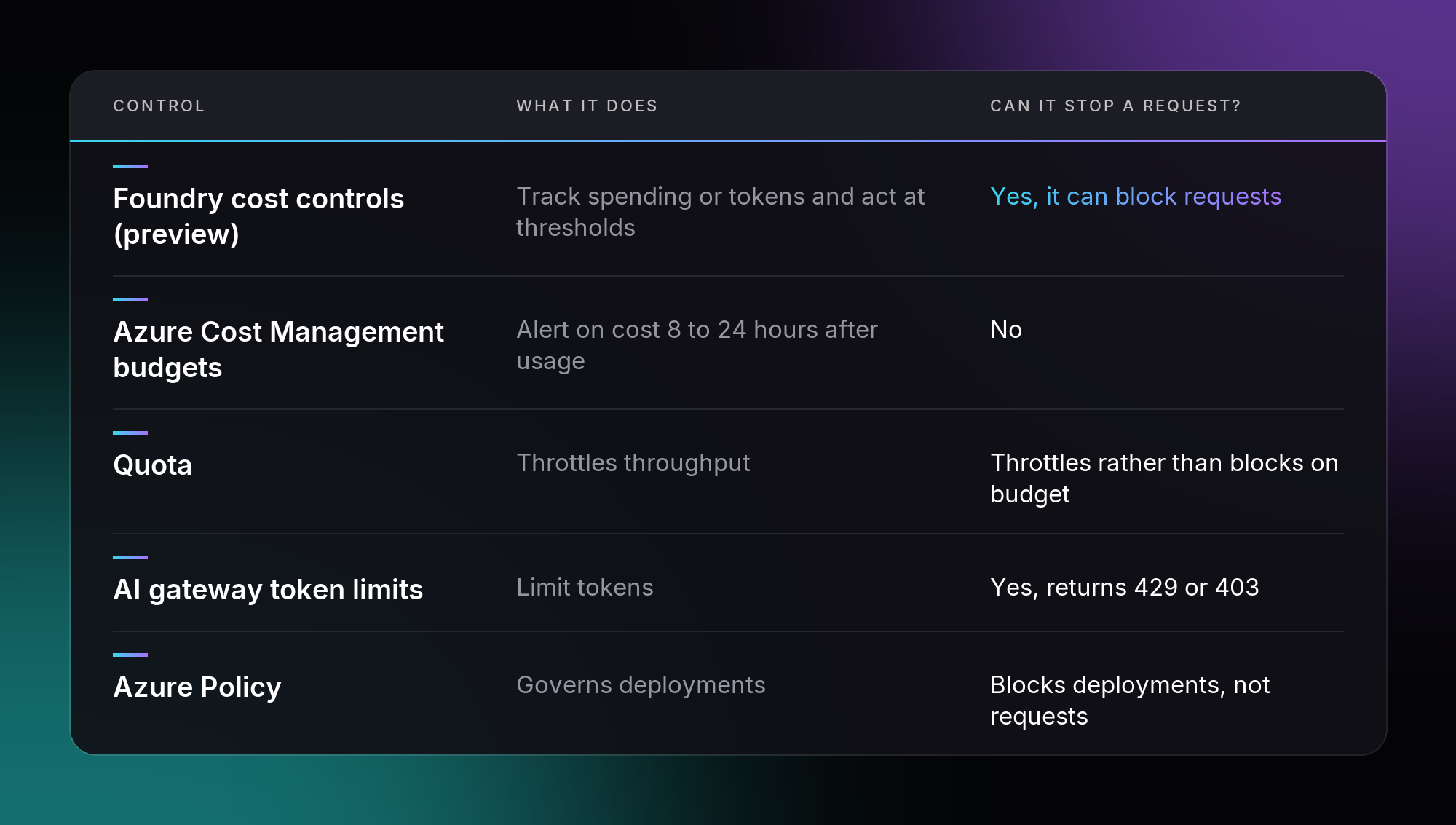
Source: Microsoft Learn, Foundry cost controls, accessed November 2026.
Sweetman's post (Microsoft Azure blog, September 2026) also names a tension finance teams will recognise. The platform enforces consumption in tokens, while finance plans in dollars. Because token prices vary by model, a token quota does not map to a stable dollar amount. Microsoft says it is working on dollar-denominated budgets. In our view, this mismatch is where many budget conversations between IT and finance get stuck.

In our LinkedIn post, we described monitoring and optimising AI consumption at multiple levels. The public Microsoft documentation supports that layered picture, and it spans more than Foundry.
Microsoft splits governance responsibilities, according to its Azure blog post on agent governance and cost. FinOps capabilities sit with Foundry, for developers and platform teams. Microsoft Agent 365 lets IT and security teams discover, inventory, secure and manage every agent in the tenant.
In the Microsoft 365 admin center, Copilot > Cost Management lets admins set identity-based and resource-based spending policies. These include limits for users, environments and agents, alerts, and consumption reporting in Copilot Credits.
For Copilot Studio, admins in the Power Platform admin center can set a monthly Copilot Credit limit per agent, with notifications and a hard stop that turns the agent off at the limit. Two details are worth knowing. Limits are not applied instantly, and an agent's limit does not stop the agent flows it calls.
Microsoft's guidance on governing credit consumption recommends layering controls. Tenant settings govern visibility and allocation, environment capacity sets the shared boundary, and agent limits add precision. The guidance also notes that Azure budgets alert but do not stop Copilot Studio consumption.
Inside Foundry, costs and cost controls follow the subscription, the Foundry resource, the project, and then the agent or model deployment. Project-level cost attribution through a project tag in Cost Analysis is in preview for models sold by Microsoft Azure (Microsoft Azure blog, September 2026).
As of 19 November 2026, Foundry cost controls are in public preview. They have no service-level agreement, and Microsoft does not recommend them for production workloads.
The preview scope is narrower than the headline suggests. Cost controls support GPT and OpenAI o-series models only, so models from other providers, such as Claude and DeepSeek, are not supported. Provisioned throughput deployments are not counted. Agent tool charges such as web search, and hosted agent compute, are not counted either. Budgets per user or per Microsoft Entra group are not available, and model router is not fully supported.
The totals need care too. During the preview, a cost control's spending total is an estimate and is not reconciled with the bill. Microsoft says it tends to be slightly higher than billed cost and recommends Azure Cost Management for reconciliation.
We'd treat the preview controls as an early-warning system and keep Azure Cost Management as the book of record.
Microsoft says its own testing shows that Foundry's model router can save up to 65% compared with sending every request to frontier models (Microsoft, November 2026). That is Microsoft's figure, not independently verified, so treat it as directional. Note the irony: model router is not yet fully supported by the preview cost controls.
The same Microsoft post reports three customer results:
These are vendor-reported outcomes, and the Alaska Airlines figure is about quality rather than cost.
Sweetman makes the point bluntly: "The least expensive agent is not necessarily the best investment." Microsoft's ROI for agents in Foundry was in private preview as of September 2026, connecting agent costs to business outcomes and calculating value generated, total cost, net value and ROI (Microsoft Azure blog, September 2026). For Copilot Studio, Microsoft's guidance on measuring agent impact groups value into four drivers: efficiency, quality, revenue and strategic (Microsoft Learn, accessed November 2026).
Microsoft positions the Foundry portal for developers and platform admins who monitor costs and enforce budgets. It positions Azure Cost Management for finance and FinOps teams who reconcile, allocate and export costs. Both use the same cost data.
That split is sensible. It also means nobody owns the whole picture by default.
We think FinOps for agents belongs inside agent management, not next to it. The questions we raised in who is managing all your AI agents (who owns an agent, what it can access, whether it still delivers value) are the same questions a budget owner needs answered. An agent with a spending limit but no owner is still an orphan, just a cheaper one.
That is also how we have built our own work. FinOps is an essential component of our broader managed services for monitoring, securing and optimising agents and their adoption. Our engineers analyse consumption alongside adoption and business outcomes to spot inefficient orchestration, optimise model selection, refine agent behaviour and lower the cost of delivering individual tasks. What they learn feeds back into the architecture, consumption forecasts and budgets of agents that haven't been built yet. Cost data sits next to security and governance, not in a separate spreadsheet.

Map which control applies where. List your agents by platform (Foundry, Copilot Studio, Microsoft 365 Copilot) and note which limit each one sits under. We'd look for gaps between platforms first.
Pair every alert with a stop where the platform offers one. Cost Management budgets tell you something happened. Foundry cost controls, gateway token limits and Copilot Studio agent limits can act on it.
Name an accountable budget owner. The Cloud Adoption Framework guidance on organisational readiness for AI agents links showback and chargeback to one. Without that person, we think alerts risk landing in a shared mailbox where nobody acts on them.
Decide where you plan in tokens and where in dollars. Foundry cost controls accept a budget in US dollars or tokens (Microsoft Learn, accessed November 2026), and in September 2026 Microsoft said it was working on dollar-denominated budgets. Wherever a limit is set in tokens, write down how you translate it into dollars.
Measure value next to cost. Pick one of Microsoft's value drivers per agent and track it beside consumption, so a rising bill can be judged against what it buys.
Think of the difference between reading your bank statement at the end of the month and carrying a card that declines at the limit. You want both. The statement tells you where the money went. The limit stops a bad week becoming a bad quarter.
Microsoft's tooling for AI spend is growing on both sides, much of it in preview. The organisations that benefit, we expect, will be the ones that connect those controls to ownership, adoption and value, rather than switching on a single budget alert and hoping for the best.
An agent that nobody uses is a sunk cost. An agent that everybody uses deserves to be managed like a colleague with a company card.
Are your AI agents delivering value as their usage grows? Talk to Digital Bricks about a managed services partnership that brings together cost control, security and adoption support, helping you monitor and optimise your agents beyond deployment.
As of 19 November 2026, Microsoft Foundry cost controls are in public preview. Microsoft states they have no service-level agreement and does not recommend them for production workloads, according to its documentation on Foundry cost controls.
Azure Cost Management budgets alert on cost but cannot block requests, and they alert 8 to 24 hours after usage (Microsoft Learn, accessed November 2026), according to Microsoft's overview of Foundry spending controls. Microsoft's Copilot Studio guidance also notes that Azure budgets alert but do not stop Copilot Studio consumption.
During the preview, Foundry cost controls support GPT and OpenAI o-series models only, as described on Microsoft Learn. Models from other providers, such as Claude and DeepSeek, are not supported, and provisioned throughput deployments, agent tool charges and hosted agent compute are not counted.
Copilot Studio admins can set a monthly Copilot Credit limit per agent in the Power Platform admin center, with notifications and a hard stop that turns the agent off at the limit, according to Microsoft's capacity management documentation. The limit is not applied instantly and does not stop the agent flows the agent calls.
Cost in Microsoft Foundry is a preview capability Microsoft announced at Ignite on 17 November 2026, described in its Azure blog post on continuous improvement in Foundry. Cost in Microsoft Foundry gives one view of spend across agents, models and tools, with a forecast and a month-end report on the assets driving the most cost.


Unlock exclusive insights and stay ahead in the digital world. No spam, only useful content.