Back to Blog
Microsoft Just Redesigned Copilot.

July 30, 2026
•
News
.png)

Here's a question worth sitting with: when was the last time a redesign actually changed how you work, rather than just how things look?
Microsoft unveiled a reworked Microsoft 365 Copilot, touching the standalone app and every corner of Word, Excel, PowerPoint and Outlook where Copilot lives. It's easy to skim past this as another interface refresh. It isn't. Buried in the design notes is a genuine rethink of what an AI assistant is even meant to do, and for anyone leading AI adoption inside their organisation, that's the part worth reading twice.
Think about how you actually start work. Rarely with a crisp, fully-formed request. More often with a half-thought, a fragment of a sentence, a problem you can't quite articulate yet. The old Copilot prompt line, a static box waiting for perfect input, quietly punished that reality. Type something vague, get something vague back.
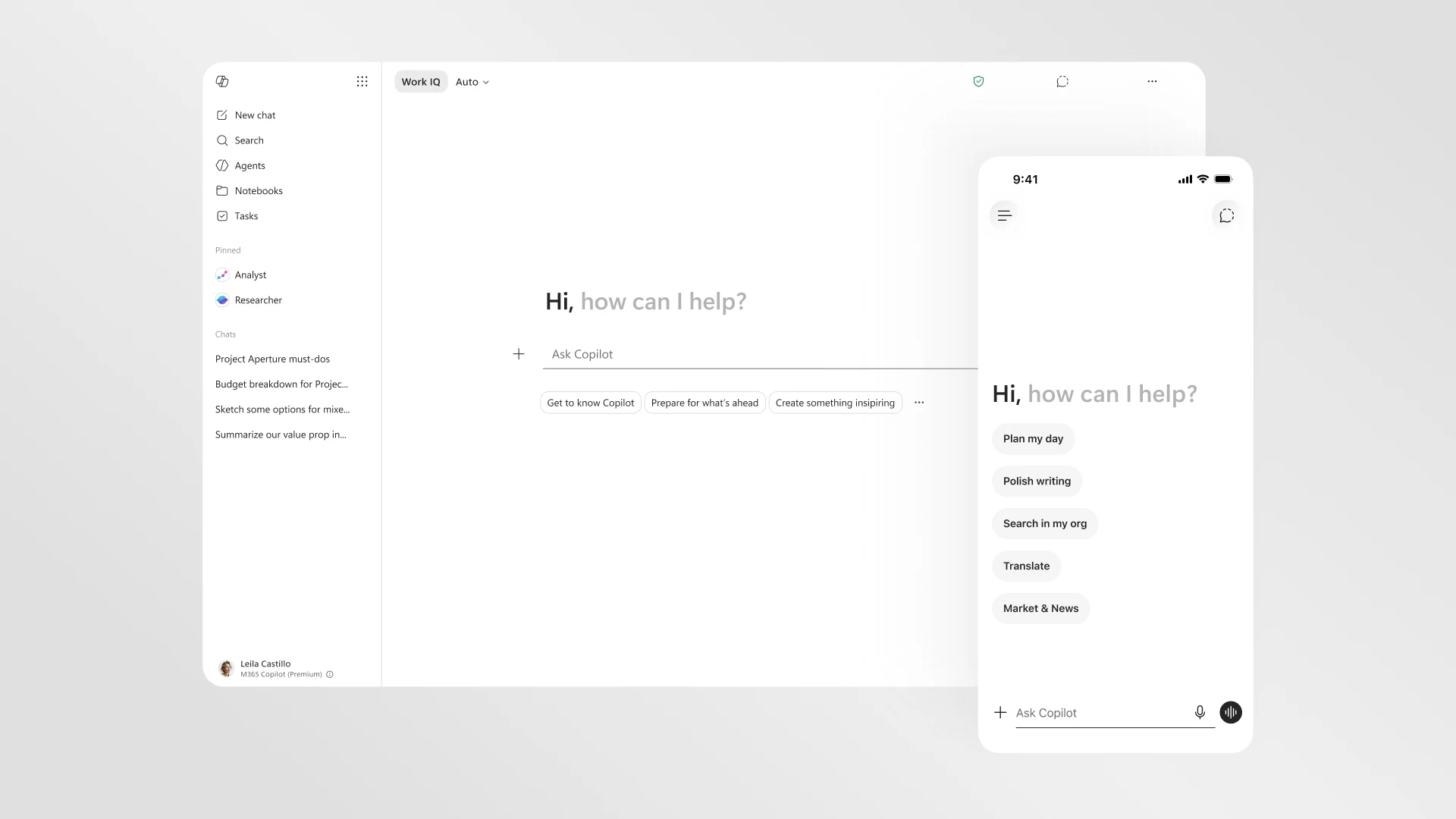
The new version reframes the box entirely: a task-aware workspace with room to think out loud, and relevant tools surfacing beneath it as the work takes shape. Small shift in language. Much bigger shift in philosophy. Microsoft is now designing for intention, not just input, which is a genuinely different problem to solve.
There's a design principle at the heart of this called progressive disclosure: reveal complexity only once it's earned its place. Simple to describe. Surprisingly hard to execute well.
In the interface, it shows up as a collapsible navigation pane, a pinning system, and clearer session history, so returning to unfinished work doesn't mean starting cold.
In the output, it's more interesting still. Copilot now opens with a clean, readable answer, then layers in structure, follow-up prompts and next actions only as the task actually demands them. No wall of information up front. Just enough, then more, exactly when you need it.
The layer making that judgement call is called Work IQ, an intelligence system reading your emails, files, chats and meetings to decide how much depth a task genuinely warrants, including which underlying model should do the reasoning. Crucially, it's visible and user-controlled, not a black box quietly making decisions on your behalf. That distinction matters enormously if you're the one accountable for how AI behaves inside your organisation. Grounded in the full sweep of someone's working context rather than a single isolated file, Work IQ is what lets Copilot meaningfully help with something as messy as a performance review cycle or a reorg, not just draft one tidy email.
A caveat before the figures, this is Microsoft's own testing, not independently audited, so treat it as directional rather than gospel. With that said, the trend is hard to ignore. The Copilot app reportedly loads over 50% faster. Response times for complex prompts have improved by roughly 10% at the slow end of the distribution. And since the redesigned in-app experiences rolled out, Microsoft reports usage climbing 27% in Word, 33% in Excel, 43% in PowerPoint, and 30% in Outlook.
Read that last part again. When the friction disappears, people don't just tolerate the tool. They reach for it more.
The structural change here might be the one that actually changes your Monday. Instead of Copilot popping up inconsistently across Word, Excel, PowerPoint and Outlook, there's now a single entry point sitting above your document, aware of everything beneath it. From there, Copilot opens as a side pane that can suggest edits or simply make them, always showing its working, or it can be summoned directly inside a paragraph, a cell, a slide, wherever the actual work is happening.
This is also where Microsoft's agentic ambitions become visible. Capability-specific agents, Designer, Researcher, and dedicated agents for Word, Excel and PowerPoint, signal that Copilot is no longer one generic assistant bolted onto every app. It's shifting from "responds when prompted" to "can act independently inside the context of your real work." That's a meaningfully different category of tool, and it opens up entirely reasonable questions about oversight, permissions and audit trails. Questions worth asking before rollout, not scrambling to answer after.
Microsoft describes this as a shift "from adding capabilities to shaping outcomes." Marketing language aside, the logic underneath is sound. The interface is the least interesting part of any AI product. What actually counts is whether the output can be trusted, whether it's genuinely useful, whether it moves work forward. Design here isn't decoration. It's the mechanism through which an AI system earns, or loses, someone's trust.
Which brings us to the tension we live inside at Digital Bricks every day. Possibility, Governance, and Adoption were never three separate conversations. They're one conversation, told from different angles. A faster, better-designed Copilot expands what's possible. But possibility without governance is just risk wearing a nicer interface, and neither possibility nor governance means a thing if your people never fold the tool into how they actually work.
A redesign like this creates a window, usage climbs the moment friction drops, but a jump in clicks isn't automatically a jump in value. Someone still has to make sure the agents now acting inside a document are doing so within clear boundaries, and that people know how to use the new workspace well rather than falling back on old habits inside a new interface. That's the quieter work behind every headline feature, and it's where Digital Bricks spend most of its time.
So skip the "does it look nicer" question. Ask the one that matters. Does this change how confidently your teams move from a rough idea to something finished and trustworthy? That's the only metric worth tracking.
Read Microsoft's full announcement here, and learn more about the Work IQ layer powering these changes here.


Unlock exclusive insights and stay ahead in the digital world. No spam, only useful content.