Back to Blog
Gemini vs ChatGPT: Which AI Model Performs Better for Your Workplace?

December 1, 2025
•
Learning
.avif)

Ever wonder which AI chatbot your team should pick when you bring your own AI to work? (Yes, BYOAI is a thing now.) At Digital Bricks we love Microsoft 365 Copilot, but we get it: some employees demand they use their ChatGPT or Google’s Gemini anyway. So if someone’s quietly chatting with Gemini or ChatGPT under the desk, which one should they use? Let’s break down Gemini vs. ChatGPT head-to-head to see which comes out on top. (Spoiler: we still think the official M365 Copilot route is the boss’s favorite in the end.)
Gemini is Google’s multimodal AI supermodel. Think of it as an all-in-one assistant that can read your emails, spreadsheets, flowcharts, images, and videos all together. Built by Google DeepMind, Gemini 3 (the latest at the time of writing) can handle text, images, and even video simultaneously without needing separate plugins. Show it a diagram and ask for code, or drop in a meeting video and get a timestamped summary, Gemini munches on all the data at once.
Because it’s a Google product, Gemini is deeply integrated into Google Workspace. It lives in Gmail, Docs, Sheets, and Search (and of course the Google app on your phone). If your company uses Google tools, Gemini feels like a natural fit. There’s a free tier you can use inside Google’s services, and a paid Google AI Pro plan (formerly Google One AI) for power users. The Pro plan gives you more cloud storage, priority access to Gemini 3 Pro (with a huge context window), and bonus features like Deep Research mode (which provides citation-style answers) and even video generation (Gemini can make short videos now, too).
ChatGPT is OpenAI’s chatty superstar, the friendly conversation partner you probably already know. Running on the latest GPT-4o/GPT-5 tech, ChatGPT excels at understanding context over a long chat, so follow-up questions feel natural. It’s designed to generate text that sounds like a human wrote it — perfect for brainstorming, drafting reports, or even cracking jokes to lighten the mood. And yes, it’s fully multimodal now too: you can speak to it in voice or show it pictures as part of the same conversation.
ChatGPT has a robust free tier (you get GPT-4o with some usage limits) and paid upgrades (Plus, Pro, Business, Enterprise) for higher limits and the newest models (GPT-5 and beyond). Even without paying, you get neat tools: a built-in web browser (so it can fetch recent info), file analysis (it can read PDFs, spreadsheets you upload), or image generation with DALL·E. Advanced users can build custom GPTs or use the OpenAI API to hook ChatGPT into other apps. Its ecosystem is mature, with a plugins store and many developer tools supporting it.
Gemini and ChatGPT are both top-tier AI, but they have different personalities and strengths:
Design & Focus: Google built Gemini from day one to be multimodal. It treats text, images, and video as a single continuous input. ChatGPT (via GPT-4o/5) is also multimodal now, but it evolved from a text-first background. In practice, this means Gemini is optimized for structured reasoning and leveraging Google’s search and knowledge graph. ChatGPT is optimized for open-ended conversation, creativity, and flexibility across tasks.
Integration: Gemini plugs directly into Google’s ecosystem (Search, Docs, Gmail, etc.), so it can pull in data from your Google files and the web. ChatGPT lives on the OpenAI/Microsoft side (and thanks to Microsoft’s investments, you even see ChatGPT tech in Bing and Teams Copilot). If your workflow is Google-centric, Gemini feels like a natural fit. If you’re on Microsoft 365 or want a platform-agnostic tool, ChatGPT (or Microsoft’s Copilot) is easier to integrate.
Output Style: ChatGPT tends to be verbose and conversational — it can spice up answers with analogies and a friendly tone. Gemini’s answers are usually concise and factual. (Imagine Gemini giving you bullet points and charts, while ChatGPT tells an engaging story.)
Performance Strengths: Gemini 3 Pro has scored very highly on math, logic, and multimodal benchmarks — it excels at data-heavy, analytical tasks. ChatGPT shines on narrative tasks, creative writing, and step-by-step explanations. For example, Gemini might give you a bullet-pointed summary of a report, while ChatGPT will provide a more narrative, engaging explanation.
Availability & Cost: Both have free options. ChatGPT offers a free tier (GPT-4o) with usage limits; Gemini is free inside Google’s apps and on the web. Paid tiers unlock superpowers: ChatGPT Plus (~$20/mo) or higher gets you GPT-5 and more usage, while Google’s AI Pro plan (around $20/mo) gives you Gemini Advanced and lots of storage. It often comes down to what you’re already paying for (Google One vs Microsoft 365 vs an OpenAI subscription).
Privacy & Security: Both meet enterprise standards. Google Workspace customers benefit from Google’s compliance programs, and OpenAI’s business customers get Azure-level security and admin controls. They’re comparable; just stick to whichever cloud your company already trusts.
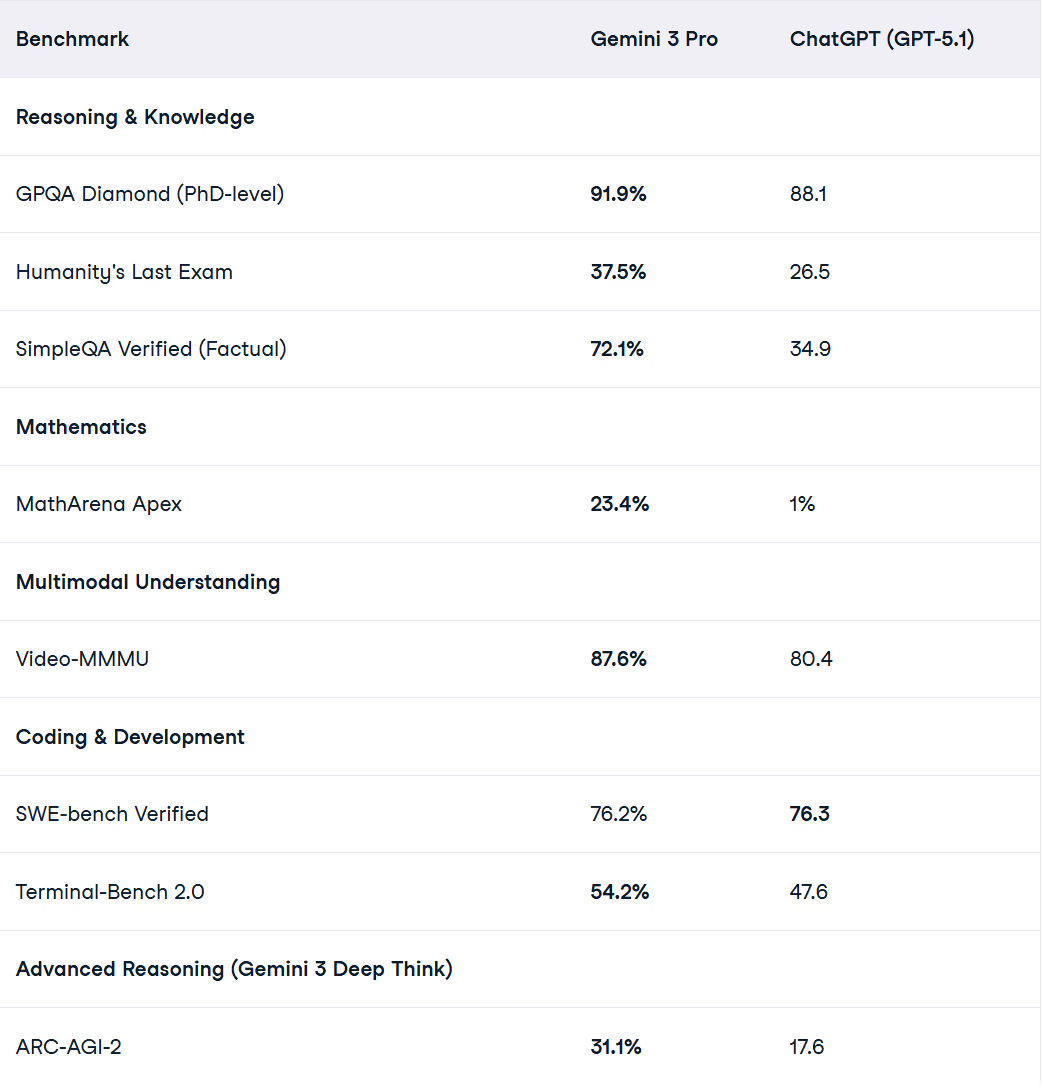
Let’s compare how each handles common tasks:
Writing & Communication:
Coding & Technical Help:
Creativity & Brainstorming:
Research & Learning:
Cost & Accessibility:
Data & Privacy: Both platforms are building strong enterprise offerings. Google’s business customers get Workspace-level protections with Gemini, and OpenAI’s enterprise plans (via Azure or directly) offer data isolation and admin controls. The bottom line: Gemini works smoothly if you trust Google Cloud; ChatGPT fits well if you’re in Microsoft/Azure’s world.
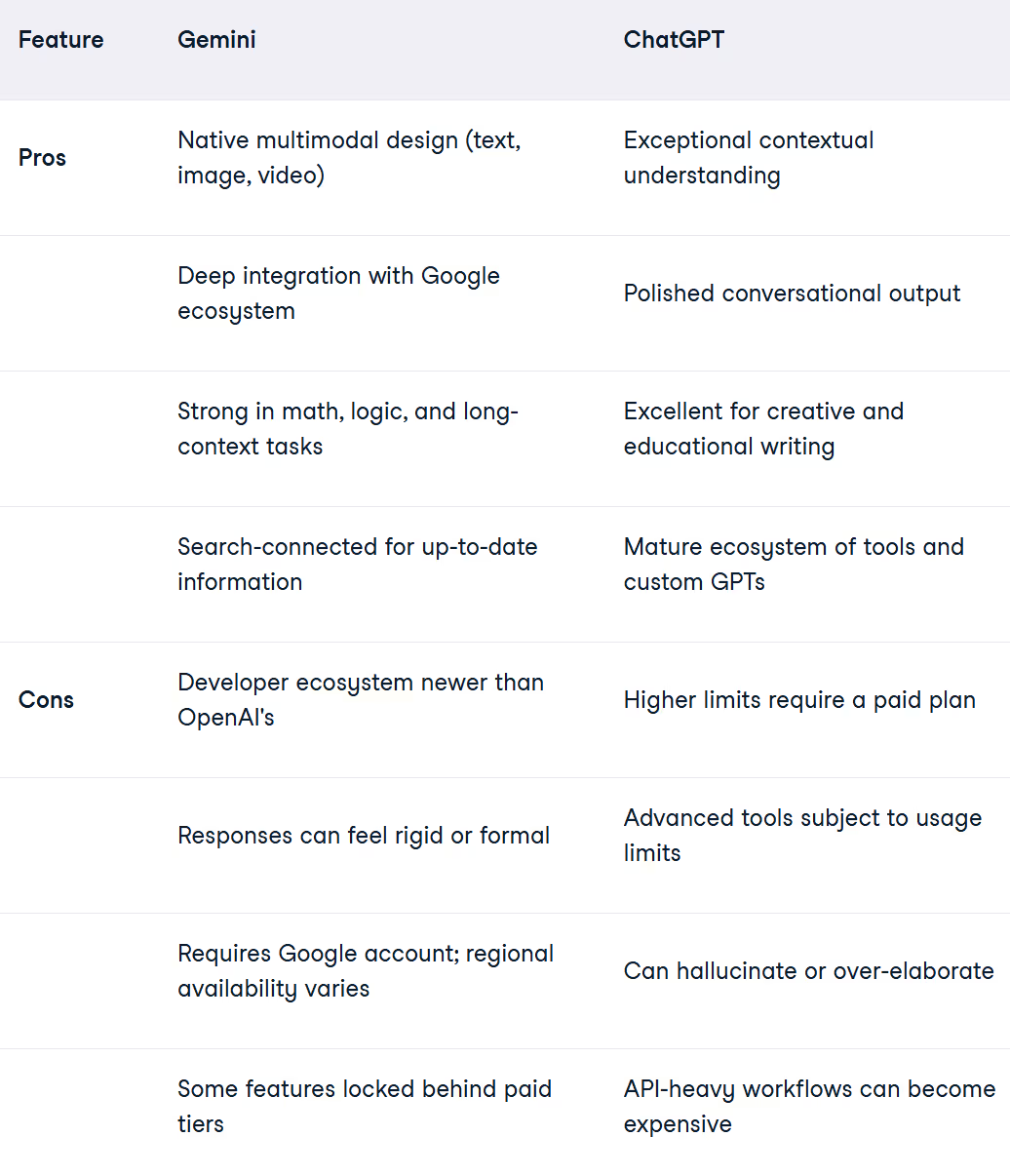
Both tools keep evolving rapidly, so these tradeoffs may shift as Google and OpenAI release updates. Usability and experience is one thing, and that's a bit harder to quantify. ChatGPT does have good name recognition, but for raw performance and multimodal capabilities, as we saw in the benchmark results, Gemini 3 does take the lead.
Here’s a quick guide for different roles:
Developers & Technical Pros: ChatGPT is awesome for exploring new libraries, APIs, or getting quick code examples in any environment. It adapts to VS Code, Jupyter, or even Teams. Gemini is a powerhouse for solving structured problems and math, especially if you use Google Colab or Vertex AI. In short: Gemini for hard data and logic; ChatGPT for flexible coding help and learning.
Business Teams & General Users: If your office lives in Google Workspace, Gemini is almost built-in: it can summarize Docs and answer questions about your Drive files. If your team uses Microsoft 365 or you just want a smooth chat interface, ChatGPT (or better yet, Microsoft’s Copilot) will feel more natural. ChatGPT often wins at creative content (marketing copy, presentations, narratives), while Gemini excels at crisp reports, precise summaries, and pulling in current facts.
Security & IT Perspective: Both platforms now meet enterprise security standards. If your company is standardized on Google Cloud, Gemini (or Google Workspace Copilot) fits existing compliance easily. If you’re on Microsoft Azure or need granular admin controls, ChatGPT (via Azure OpenAI Service or Copilot for Microsoft 365) might slide in better. Either way, official plans from both OpenAI and Google promise data protection – the choice is often about which vendor your IT already manages.
And remember: if you already have Microsoft 365, one obvious pick is Microsoft Copilot — think of it as ChatGPT/Gemini technology built right into Word, Excel, and Teams, using your company data. But for a true “BYOAI” scenario, these guidelines should help.
Gemini and ChatGPT represent two different AI philosophies: Google’s integrated, fact-driven approach versus OpenAI’s flexible, conversational one. Both are impressively capable. In the end, the better choice for your team depends on your needs and ecosystem.
At Digital Bricks, we encourage smart AI adoption. If your crew really wants to use one of these tools, at least they’ll be picking a winner in each category. But if you have the option, rolling out a managed solution is best. That’s where our Copilot Adoption Accelerator comes in.
Digital Bricks’ Copilot Adoption Accelerator provides a structured roadmap to move your organization from AI experimentation to full Copilot adoption. The program helps you:
With this approach, your team won’t be stuck debating Gemini vs. ChatGPT. They’ll be collaborating with Copilot every day: getting work done faster and smarter.
Whatever you choose, have a plan. If you need help navigating the AI landscape, Digital Bricks is here to guide you. Check out our Copilot Adoption Accelerator and start transforming the way you work with Microsoft Copilot.


Unlock exclusive insights and stay ahead in the digital world. No spam, only useful content.